
If you are searching for an “App Store screenshot generator” or an “AI store screenshot tool,” you probably need more than a phone frame around an image. You want to create marketing assets that communicate your app’s value, meet size requirements, and remain easy to update. The open-source project ParthJadhav/app-store-screenshots is designed for that whole process.
What is App Store Screenshots Skill?
App Store Screenshots Skill is an open-source skill for AI coding agents such as Claude Code, Cursor, Windsurf, OpenCode, and Codex. Once installed, it guides the agent to generate a store screenshot editor in your project using Next.js, React, and TypeScript. The result is an editable tool, rather than a static image you cannot easily revise.
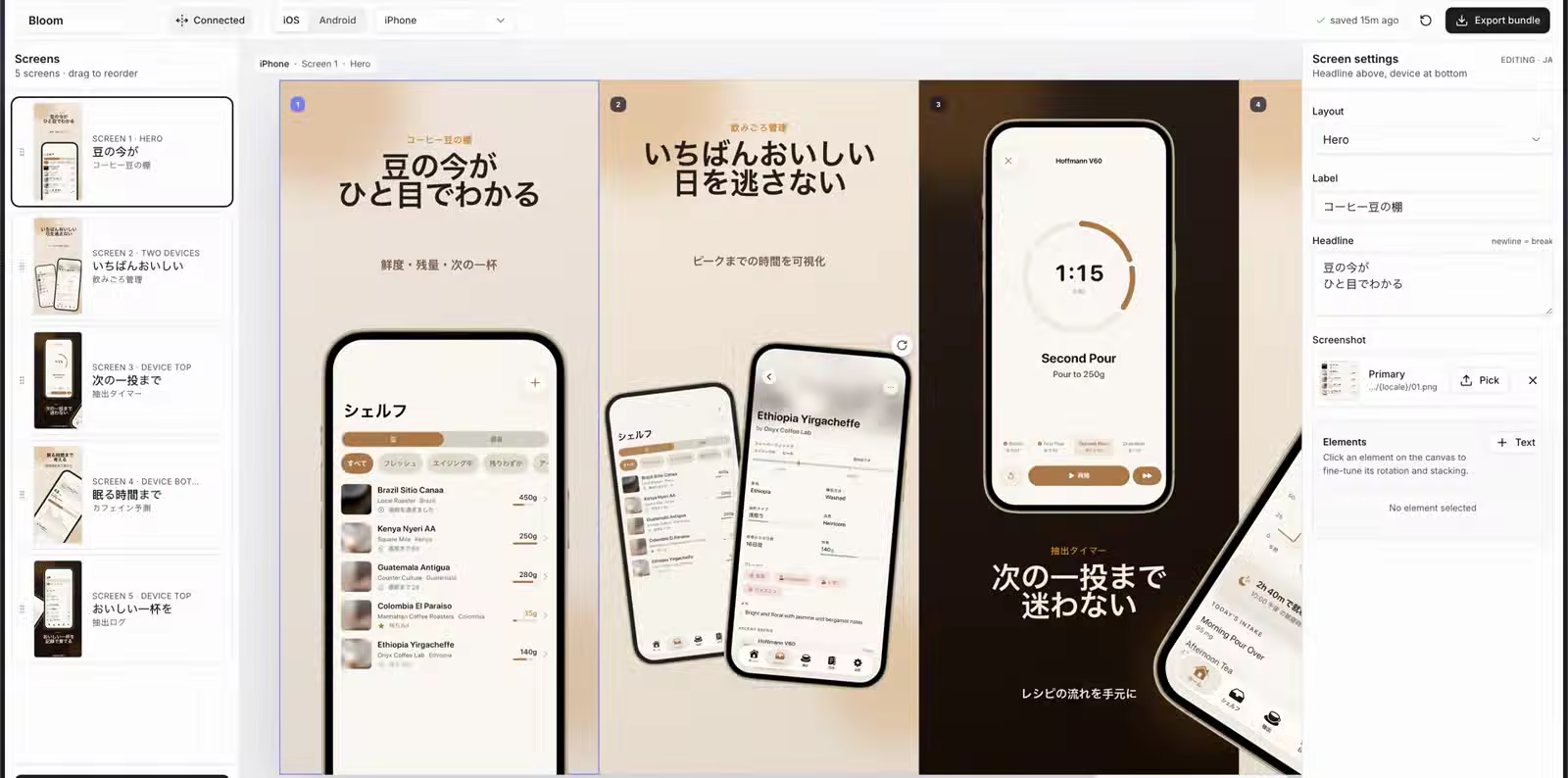
The editor gives you separate canvases for iPhone, iPad, Android phones, Android tablets, and the Google Play Feature Graphic. You can drag devices, text, and decorative elements, switch themes and languages, and export every required size as a set of PNG files.
“Screenshots are advertisements, not documentation.”
— A core principle of App Store Screenshots Skill
That principle explains how it differs from a typical mockup tool: a store screenshot should communicate a user benefit in a second, then show the interface. Give each image one selling point, and make sure its headline remains readable at the thumbnail size used in search results.
Why is this more useful than asking AI for a few images?
Image generation tools are useful for exploring a visual direction. Store assets also need accurate UI and text, dependable dimensions, and ongoing updates for new releases and languages. This skill gives the agent a more suitable job: build the production tool, organize the assets, and propose designs, while leaving final control in the visual editor.
- The result is usually a single static image
- Sizes and languages require repeated manual work
- Changes are difficult to track
- Delivers a complete Next.js editor
- Manages devices and languages together
- Stores project state as JSON you can commit to Git
Six useful capabilities
Connected Canvas
Design the screenshot sequence side by side. Phones, paths, and decorations can span neighboring screens, with precise cropping at export time.
Visual Inspector
Use the right-hand panel to adjust headlines, labels, layouts, layers, rotation, scale, and screenshot sources without editing page code by hand.
Canvases for multiple platforms
One workflow covers iPhone, iPad, Android phones, 7-inch and 10-inch tablets, and the Feature Graphic.
Localization and RTL
Save copy and screens by locale, and check layouts for right-to-left languages such as Arabic and Hebrew.
Persistent project state
app-store-screenshots.json is a readable, reviewable source of truth, so you can continue working after moving to another computer.
Batch export
Export files organized by platform, device, resolution, and language, reducing the resizing and renaming work before submission.
From raw screenshots to store-ready assets
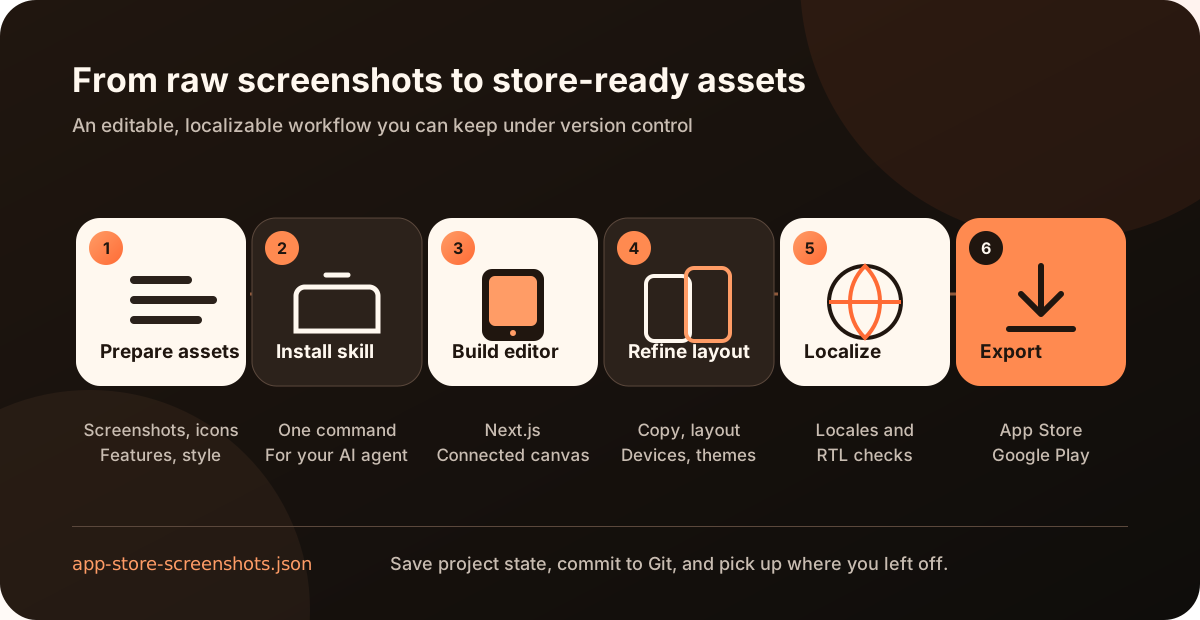
The process has six steps: prepare real device screenshots and an app icon; install the skill; ask the agent to generate or migrate the editor; refine the narrative and visuals on the connected canvas; complete each locale; and export the image packages your stores require.
How do you install it and get started?
The quickest way is through the skills CLI. The project requires Node.js 18 or later and supports bun, pnpm, yarn, or npm.
npx skills add ParthJadhav/app-store-screenshots
After installation, give the agent more than “make a few screenshots.” A brief covering the product’s value, feature priorities, target devices, languages, style, and number of screens will produce a much stronger first version.
Suggested prompt template
Create App Store screenshots for my habit tracking app. It helps people maintain a streak with a simple daily plan. The most important features, in order, are quick check-ins, trend reviews, and home screen widgets. I need two iPhone sets, one in English and one in Simplified Chinese, with six screenshots each. The visual style should be clean, warm, and polished. Real screenshots are in ./marketing/screenshots, and the icon is at ./AppIcon.png.
Assets to prepare in advance
- Real app screenshots from a simulator, emulator, or physical device
- A transparent or high-resolution app icon
- A one-sentence product description and three to five key selling points
- Your target stores, devices, languages, and number of screens
- Brand colors, fonts, or reference apps
Which App Store and Google Play sizes can it export?
The skill designs at the largest supported size for each platform, then generates the smaller versions. The table below lists common export presets built into the project. Before submitting, check the latest Apple Screenshot Specifications and Google Play Preview Assets requirements.
| Store | Device / asset | Export resolution |
|---|---|---|
| Apple App Store | 6.9-inch iPhone | 1320 × 2868 |
| 6.5-inch iPhone | 1284 × 2778 | |
| 6.3-inch iPhone | 1206 × 2622 | |
| 6.1-inch iPhone | 1125 × 2436 | |
| Google Play | Phone, portrait | 1080 × 1920 |
| 7-inch tablet | 1200 × 1920 / 1920 × 1200 | |
| 10-inch tablet | 1600 × 2560 / 2560 × 1600 | |
| Feature Graphic | 1024 × 500 |
Note: Google Play has additional rules for specific form factors, including Wear OS and Android Automotive OS. Screenshots must accurately represent existing app features; avoid misleading images or marketing claims.
Who is it for, and what are its limits?
A good fit for
- Independent developers and small product teams
- Apps released on both iOS and Android
- Projects that frequently update feature screenshots
- Teams maintaining store assets in multiple languages
Things to keep in mind
- You still need high-quality screenshots of the real product
- The first draft of the copy needs product judgment and human review
- Complex brand visuals may require extending the theme code
- Every exported image still needs a thumbnail and compliance check
It can remove repetitive work and the cost of building your tools, but it does not replace product positioning, brand strategy, or final review. Let the agent build the workspace and propose options; let a designer or developer make the decisions and check the result.
Frequently asked questions
Does it only generate iOS App Store screenshots?
No. The project supports iPhone, iPad, Android phones, Android tablets, and the 1024 × 500 Google Play Feature Graphic.
Can I use it without a design background?
Yes. The skill provides themes, layouts, and copywriting principles, and the editor supports drag-and-drop adjustments. If your app has strict brand guidelines, a designer should still review the final result.
Can I hand the screenshot project over to my team?
Yes. Both the image assets and app-store-screenshots.json can be committed to Git. Team members can clone the project, install its dependencies, and continue editing.
Does it automatically capture every screen in my app?
No. The skill focuses on designing, arranging, and exporting store marketing screenshots. For iOS projects, the author’s ios-marketing-capture skill can help automate the capture of source screenshots. For other stacks, prepare the assets manually first.
Should you add it to your release workflow?
If every release means repeating the same resizing, device framing, copy placement, and language-folder cleanup, it is worth considering. The main value of App Store Screenshots Skill is turning a scattered marketing asset process into a project you can edit, reuse, review, and hand over.